How to Get Your Smart Meter Data
To compare tariffs accurately you need 30-minute electricity readings. This guide explains the easiest ways to get them.
Many UK suppliers let you download 30-minute meter data directly from their website. Sign up for personalised guidance based on your specific supplier — or follow the Bright app steps below to get your data either way.
Sign up to compare · Log in
Using the Bright App
If your supplier doesn't let you download your readings directly, the free Bright app is the easiest solution. It connects to the national smart meter network and lets you access your 30-minute electricity data — no extra hardware needed. It's developed by Glowmarkt.
Step 1: Visit your app store and download the Bright app.


Step 2: Register within the Bright app.
- Login into the Bright app.
- From the menu ☰ (three lines) select Settings.
- Find and select Consent and Meter Management.
- You will be asked if you have a Home Display.
You will then be asked to enter the following information:
- Enter your postcode.
- Enter the GUID / MAC / EUI code.
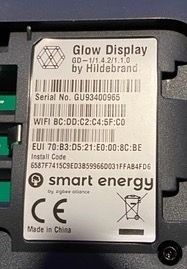
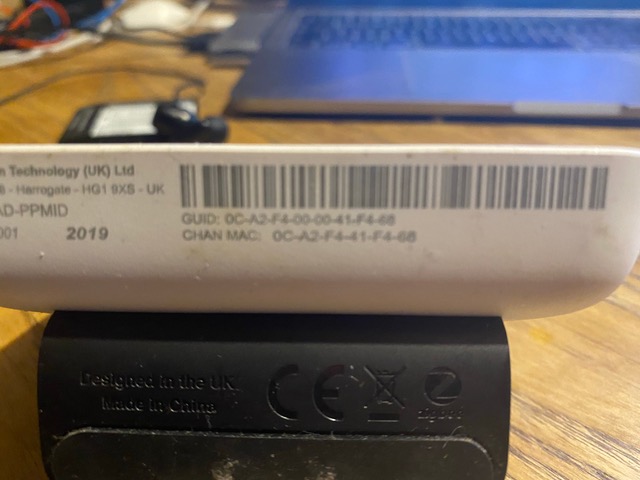
The GUID / MAC / EUI code is normally found on the rear of the Home Display or within its settings menu. Example photos are provided in the app to help you locate it.
This completes registration of your smart meter with Bright.
Data may take 24–48 hours to appear.
You will then be asked to complete verification:
- Click YES to proceed with verification.
- Select Proceed when asked for verification information.
- Enter your MPAN number.
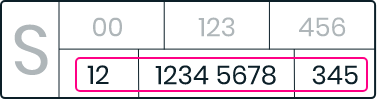
You must then upload a recent energy bill from the last 3 months.
This completes registration of your smart meter with Bright.
Data may take 24–48 hours to appear.
Once your Bright account is set up and your meter data is available, you can connect your Bright account directly to this platform. Your readings will then be fetched automatically every night — no manual CSV downloads required.
Or download manually using the steps below:
- Visit https://glowmarkt.com
- Click the menu ☰ (top right).
- Select Sign In.
- Login using the same username and password as the Bright app.
- From the left menu under Energy, select Download your data.
- Under Data Granularity select 30min.
- Click Download data.